

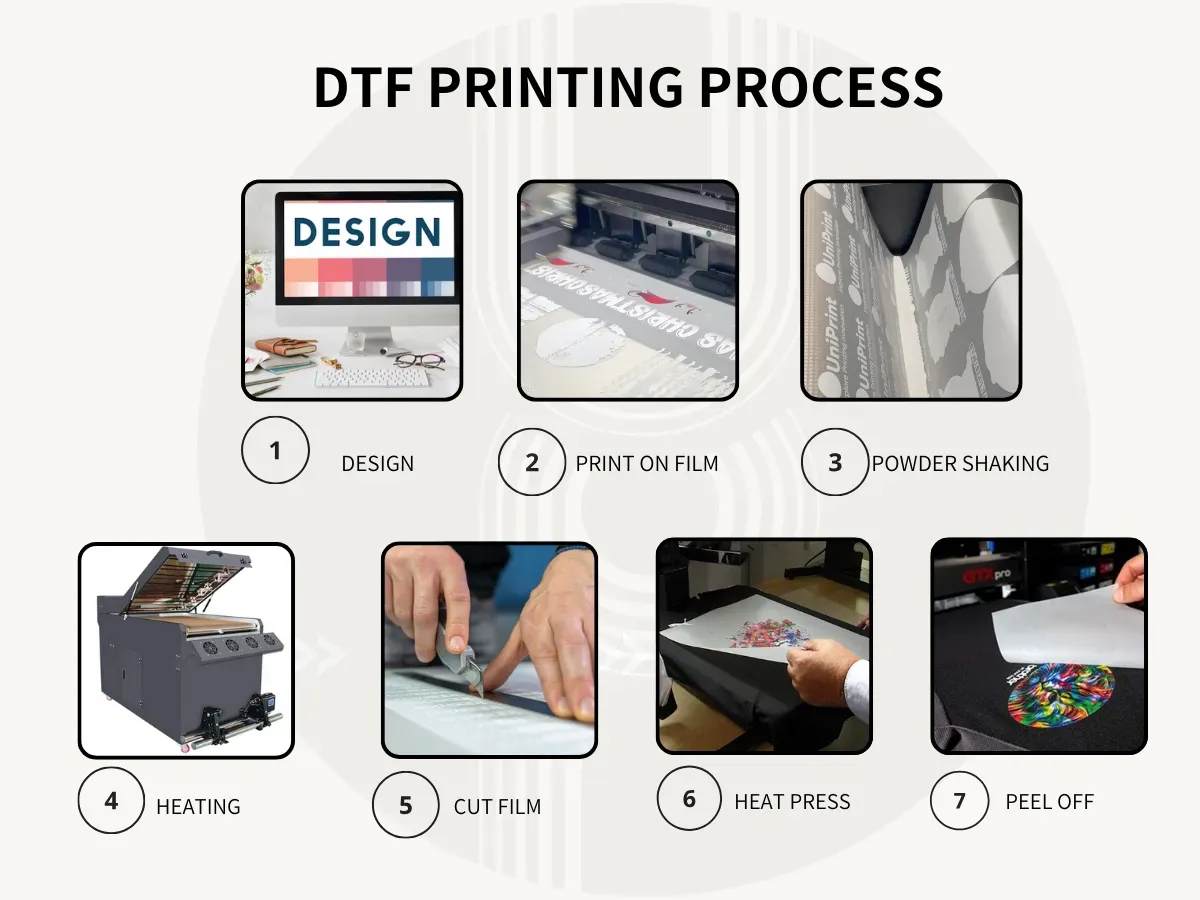
DTF printing has transformed garment customization by combining digital design with a transfer-on-film process, enabling bold colors, fine details, and durable finishes that stay vibrant after washing. This guide provides a practical DTF transfer guide for beginners and seasoned printers alike, outlining a repeatable workflow that can scale from small runs to larger production. From choosing the right printer and PET film to calibrating the color management profile, you’ll learn to set up a reliable system that minimizes waste and reduces trial-and-error. The approach emphasizes consistent measurements, precise powder adhesion, careful curing, and even heat transfer, so you can reproduce the same result across different fabrics and sessions. By the end, you’ll have a clear understanding of how DTF printing delivers vibrant designs with strong adhesion, enabling durable results across cotton, blends, and beyond.
The topic can be framed through alternative terms such as film-based transfer technology, PET-film decoration workflows, or digital textile printing on a carrier film. In essence, this approach relies on a printed image loaded onto a film carrier, coated with adhesive powder, cured, and then bonded to fabric with heat and pressure. Using these different descriptors helps connect readers with related concepts like printer setup and color management, workflow optimization, and material testing across fabrics. Recognizing the shared underlying process also supports broader SEO by linking to terms such as color calibration, RIP settings, and curing parameters while keeping the narrative accessible.
Direct-to-Film Printing Essentials: What DTF Printing Is and Why It Works
Direct-to-Film printing, or DTF printing, is a digital method that prints a design onto a specialized PET film using water-based inks. The printed film is then coated with an adhesive powder, cured to activate the powder, and finally transferred to textiles with heat and pressure. This approach creates vibrant color, flexibility across fabrics, and the ability to reproduce complex multi-color designs without the need for screens or extensive setup. By leveraging Direct-to-Film printing, shops can offer short runs, personalization, and rapid turns with less equipment and fewer screens than traditional methods.
This method unites creative design with a repeatable workflow from concept to finished garment. Having a solid DTF transfer guide helps beginners understand each stage—design preparation, film printing, powder coating, curing, and the transfer itself—while giving seasoned printers a reliable, scalable process. Because color fidelity depends on proper color management and precise transfer parameters, investing in a robust process yields high-quality DTF prints that resist fading and cracking across a range of fabrics.
DTF Printer Setup and Workflow: Building a Reliable Production Process
A reliable DTF printer setup and workflow starts with choosing compatible equipment: a DTF-capable printer, PET film, a high-quality adhesive powder, an effective curing method, and a heat press suited to your fabrics. The software side matters too, with color management tools and RIP settings that translate your design accurately to film. The core workflow remains consistent: print on film, apply powder, cure, and transfer, with calibration at key points to minimize variation.
Consistency comes from documenting parameters and performing quick checks before production runs. By routinely validating color profiles, film orientation, and press settings, you create a stable environment for producing high-quality DTF prints. Over time, refining the DTF printer setup and workflow reduces waste, speeds up throughput, and improves repeatability across multiple batches.
Selecting Materials for High-Quality DTF Prints: Films, Powders, and Inks
Selecting materials for DTF printing starts with the film itself: a PET film designed for DTF transfers that lays flat under heat and resists warping. The next pieces are the adhesive powder, curing equipment, and a heat press tuned to your fabric’s needs. You’ll also need transfer papers or films, color management tools, and appropriate software to prepare artwork. While brands differ, the essential sequence remains: print on film, powder, cure, and transfer, so choosing compatible components matters for reliability.
Understanding fabric compatibility and test runs is critical to achieving high-quality DTF prints. Use fabric swatches to check adhesion, color density, and softness, and maintain a controlled environment to prevent humidity from affecting powders. Align your powders, films, and inks with your printer capabilities, and perform small test runs to lock in dependable results before scale production.
DTF Inks and Color Management: Achieving Accurate, Reproducible Colors
DTF inks and color management play a central role in vibrant, predictable results. Color management requires calibrating both your monitor and your printer with a consistent profile, using high-resolution artwork (ideally 300 DPI) and exporting with color profiles that match your printer’s capabilities. For dark fabrics, a white underbase helps colors pop after transfer, and a well-tuned ICC workflow ensures tonal accuracy across run after run.
As you expand, document your color management steps and maintain a library of ICC profiles for different film and fabric combinations. The interaction of DTF inks with the curing process and adhesive layer means small changes can impact color density and edge detail. With careful attention to DTF inks and color management, you can consistently produce outputs that meet client expectations and stand up to washing and wear.
The DTF Transfer Guide: From Design Prep to a Crisp, Durable Finish
The DTF transfer guide begins with design preparation and prepress checks. Start with a design sized for the garment, ensure color management is embedded, export as a PNG with transparency if needed, and run a test print on spare film to verify balance and sharpness. If working on dark fabrics, incorporate a white underbase in your design or rely on your printer’s white channel to maximize contrast before the transfer.
Next comes powder coating and curing, followed by the actual transfer. Coat the printed film lightly with adhesive powder, cure to fuse the powder, and position the film on the fabric with the printed side up. Set the heat press to the recommended temperature and time for your adhesive and fabric, apply steady pressure, and allow the film to cool before removing the carrier sheet. This sequence yields a crisp, vibrant image with durable adhesion suitable for apparel and other textiles.
Troubleshooting Common DTF Printing Issues: Optimization for Consistent Results
Troubleshooting common DTF printing issues focuses on identifying root causes in color management, registration, and adhesion. Color shift or fading points to misaligned ICC profiles or inconsistent density, while ghosting signals misregistration or feed path issues. Powder residue or poor adhesion may indicate too much powder, an insufficient cure, or surface contamination on the film.
Optimization for consistency means building a repeatable workflow with documented parameters, regular equipment maintenance, and fabric-specific test runs. Recalibrate platen alignment, verify film alignment during printing, and adjust ink density as needed to counter color drift. Keeping track of DTF inks and color management parameters helps your team reproduce results and deliver dependable, durable DTF prints.
Frequently Asked Questions
What is DTF printing and how does Direct-to-Film printing work in practice?
DTF printing, or Direct-to-Film printing, is a digital process that prints a design onto a PET film using water-based inks, then coats the film with adhesive powder, cures it, and transfers the image to fabric with heat and pressure. This method delivers vibrant colors, supports fine details and multi-color designs, and avoids screens or extensive setup. It’s a practical option for on-demand and small-batch apparel with strong transfer performance.
What equipment do I need for a reliable DTF printer setup and workflow?
A reliable DTF printer setup typically includes a DTF-capable printer, PET film designed for transfers, high-quality adhesive powder, a curing method, and a heat press suitable for your fabrics, plus transfer film/paper, color management software, and RIP settings. The DTF printer setup and workflow should emphasize accurate color control, proper film handling, and consistent curing and pressing parameters for repeatable results.
How do I manage color to produce high-quality DTF prints?
Color management is critical for high-quality DTF prints. Calibrate your monitor and printer with a consistent color profile, work at 300 DPI for sharp results, and use ICC profiles that match your film and fabric. For dark fabrics, employ a white underbase to maintain brightness, and test swatches before large runs to prevent costly reprints.
What are common issues in DTF transfers and how can I troubleshoot them using a DTF transfer guide?
Common issues include misregistration, color shifts, powder residue, and poor adhesion. Follow a DTF transfer guide: confirm film alignment and printer feed, verify color profiles and density, ensure even powder application and proper curing, and double-check transfer temperature and pressure for your fabric to diagnose and fix problems quickly.
What is the recommended procedure for curing adhesive powder to ensure durable DTF prints?
After printing, apply a light, even adhesive powder while the film is still damp, then remove excess powder and cure according to the manufacturer’s guidelines (often around 160–170°C for a short time). Inspect for clumps and re-powder or re-cur e if needed, ensuring the coating bonds strongly to the fabric without creating an uneven surface.
How can I scale DTF printing while maintaining consistency and minimizing waste?
Develop a standardized DTF workflow with checklists, document material parameters for each fabric type, and maintain a fabric swatch library for color verification. As you scale, consider upgrading to RIP software with advanced color management, batch curing options, and reliable powder application to sustain high-quality DTF prints and reduce waste.
| Topic | Key Points |
|---|---|
| What is DTF printing | Digital method printing designs onto PET film, then applying adhesive powder, curing, and transferring via heat/pressure. Provides vibrant colors, supports complex multi-color designs, and works across fabrics without screens or extensive setup. |
| Workflow goals | Step-by-step tutorial designed for beginners and seasoned printers; aims for a repeatable, scalable process with minimized waste, easier troubleshooting, and durable, vibrant results. |
| Required equipment & materials | DTF-capable printer, PET film, adhesive powder, curing method, heat press suitable for fabrics, transfer paper/film, color management tools, and artwork software; workflow: print → powder → cure → transfer. |
| Materials & color management | Color management is critical. Calibrate monitor and printer with a consistent color profile; use high-resolution artwork (300 DPI); consider white underbase for dark fabrics; test fabric swatches before large runs. |
| Step-by-step workflow overview | Design prep; print settings and color calibration; powder coating and curing; transfer basics; post-transfer care; troubleshooting; maintenance; equipment selection; FAQs. |
| Powder coating & curing | Apply a thin, even adhesive powder; remove excess powder; cure per manufacturer; inspect coverage and rework if needed. |
| Transfer process | Place coated film on fabric with printed side up; pre-press; set 160–170°C and 10–20 seconds; apply steady pressure; cool briefly before removing carrier sheet for a crisp, durable transfer. |
| Post-transfer care | Cool completely, wait 24 hours before washing; turn inside out; use mild detergent; avoid high heat; re-press if needed to boost durability. |
| Troubleshooting & optimization | Address color shift, ghosting, powder residue, cracking by reviewing color management, ensuring proper calibration, re-curing, and fabric testing. |
| Maintenance & workflow optimization | Regularly clean heads and paths, store films/powders properly, use checklists and fabric swatches, document parameters for reproducibility. |
| Equipment & supplies selection | Choose printers with robust color control, compatible films/powders, and RIP software; consider batch curing and automation to improve efficiency. |
| FAQs & practical considerations | Inks compatibility (specialized water-based inks for film); separate heat press considerations; durability depends on fabric and cure; test fabrics before production. |
Summary
HTML table has been generated to summarize the key points of the base content on DTF printing. A descriptive, SEO-friendly conclusion follows.